Void a Check: Difference between revisions
Jump to navigation
Jump to search
(Created page with "If you need to void a check that you have previously written, whether in the current month or in a previous, already closed month, go to Accounting / Void a Check. # Use the sort options to find and select the check you wish to void. # Verify that the date and memo accurately record what you are doing. # Click OK. # Verify the information in the pop-up, and click OK again. The check you selected has been recorded as void. Jewel will either edit the check to make the am...") |
No edit summary |
||
| Line 1: | Line 1: | ||
==Void the Check== |
|||
If you need to void a check that you have previously written, whether in the current month or in a previous, already closed month, go to Accounting / Void a Check. |
If you need to void a check that you have previously written, whether in the current month or in a previous, already closed month, go to Accounting / Void a Check. |
||
| Line 6: | Line 7: | ||
# Verify the information in the pop-up, and click OK again. |
# Verify the information in the pop-up, and click OK again. |
||
The check you selected has been recorded as void. Jewel will either edit the check to make the amounts $0 (if the check is in the current month) or record a new transaction in the current month to cancel out the check that you're voiding. |
The check you selected has been recorded as void. Jewel will either edit the check to make the amounts $0 (if the check is in the current month) or record a new transaction in the current month to cancel out the check that you're voiding. |
||
[[File:Void_A_Check_screen.png|center|600px]] |
[[File:Void_A_Check_screen.png|center|600px]] |
||
==Reconcile the Voided Check== |
|||
In the Bank Reconciliation, you will then mark off the $0 check, or both the original check and the new reversing transaction, to remove them from the list of checks waiting to be cleared. Since the total amount you are checking off is $0, it will not affect your balance. |
|||
Revision as of 12:24, 17 December 2025
Void the Check
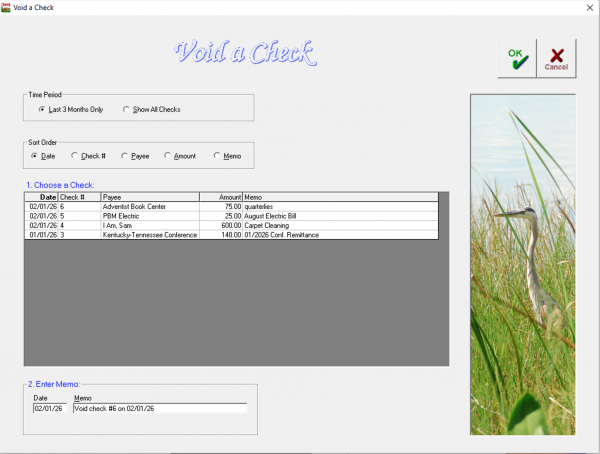
If you need to void a check that you have previously written, whether in the current month or in a previous, already closed month, go to Accounting / Void a Check.
- Use the sort options to find and select the check you wish to void.
- Verify that the date and memo accurately record what you are doing.
- Click OK.
- Verify the information in the pop-up, and click OK again.
The check you selected has been recorded as void. Jewel will either edit the check to make the amounts $0 (if the check is in the current month) or record a new transaction in the current month to cancel out the check that you're voiding.

Reconcile the Voided Check
In the Bank Reconciliation, you will then mark off the $0 check, or both the original check and the new reversing transaction, to remove them from the list of checks waiting to be cleared. Since the total amount you are checking off is $0, it will not affect your balance.